

LMS/lms/organization-usage
Usage & Billing
AI credit consumption & event log
What you can do here
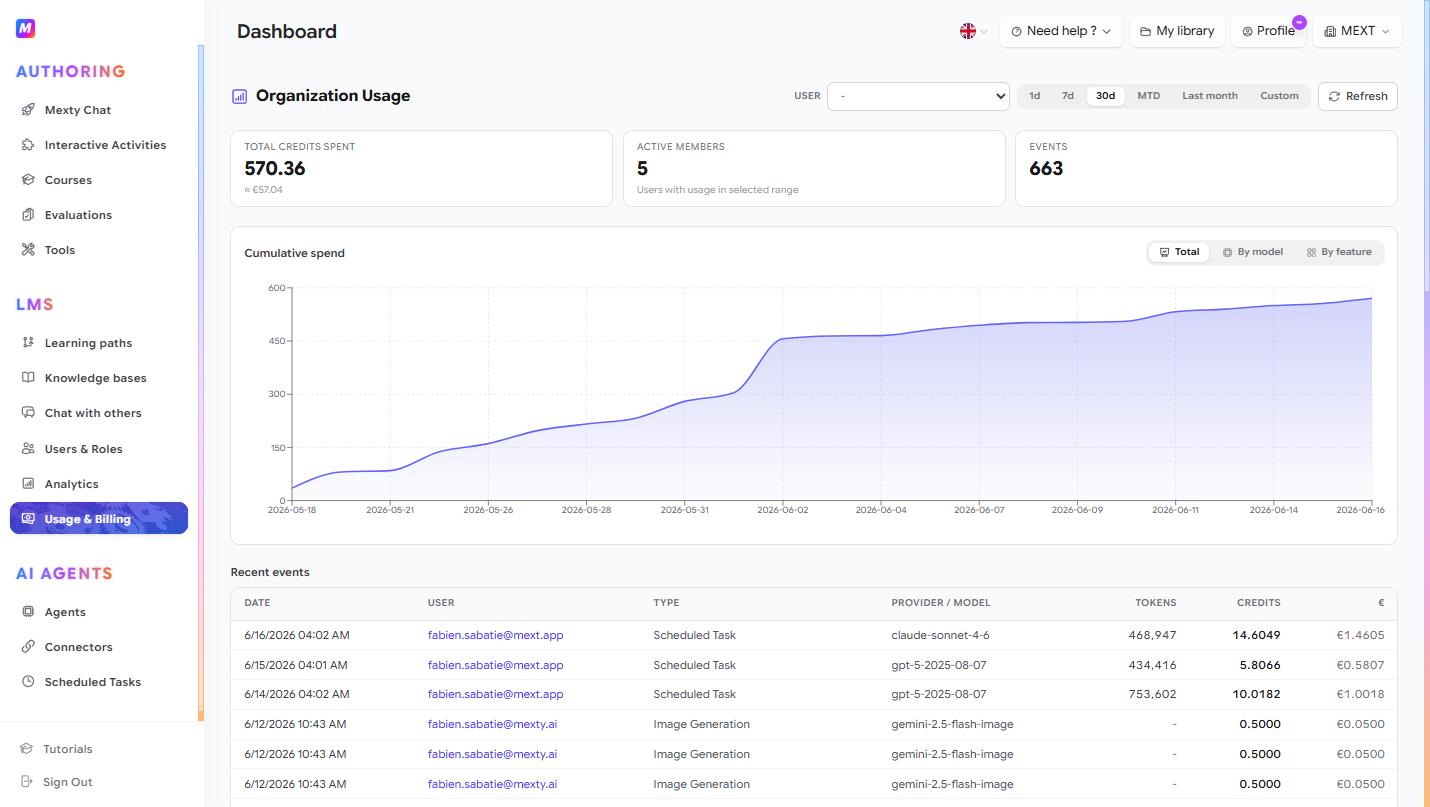
See how many AI credits your organization is using, who's using them, and on what. Use it to monitor spend and understand which features and members drive cost.
Check your usage
- Open the dashboard (
/lms/organization-usage). - Pick a time range — 1d, 7d, 30d, MTD, Last month, or Custom.
- Read the KPI cards: Total Credits Spent (with the EUR equivalent), Active Members, and total Events.
- Click Refresh to pull the latest data.
See trends and breakdowns
Use the Cumulative Spend chart to watch credits accumulate over time, and switch the view between Total, and to find what's driving the spend.
Investigate individual activity
- Filter by a specific user with the USER dropdown to see one person's consumption.
- Scroll to the Recent Events table for a line-by-line log: date, user, event type, provider / model, tokens, credits and euro cost.
- Event types include Mexty Chat, General Router, Image Generation, Block Thumbnail Generation and Spawned Subagent.
Tips
- Use By feature to see whether courses, activities or image generation cost the most.
- Filter by user to spot unusually heavy usage early.
- Check MTD regularly so monthly spend never surprises you.